
Lab Interface Software for Physician Practices
A unified platform architected for precision-driven environments, our certified solutions simplify lab operations, enable secure interoperability, and scale reliably with evolving clinical and research demands.
Every Feature, Aligned With Your Goals
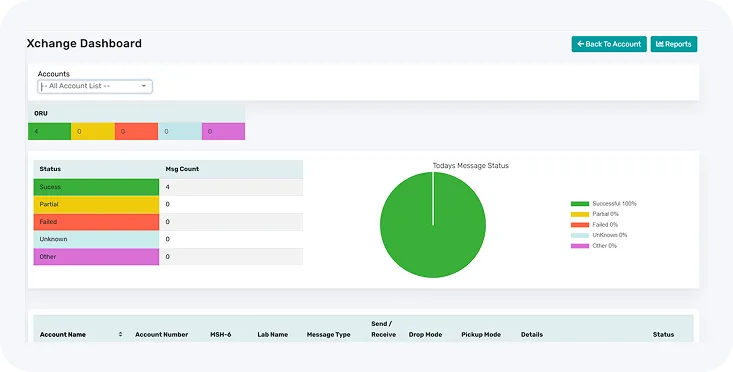
Precision is everything in laboratory communication. OmniXchange employs deterministic normalization algorithms that ensure every HL7, FHIR, JSON, or XML transaction retains full clinical context during conversion. Unlike traditional parsers, it validates each segment against medical ontologies and code sets, ensuring no semantic drift, no misinterpretation, and complete audit traceability across systems.
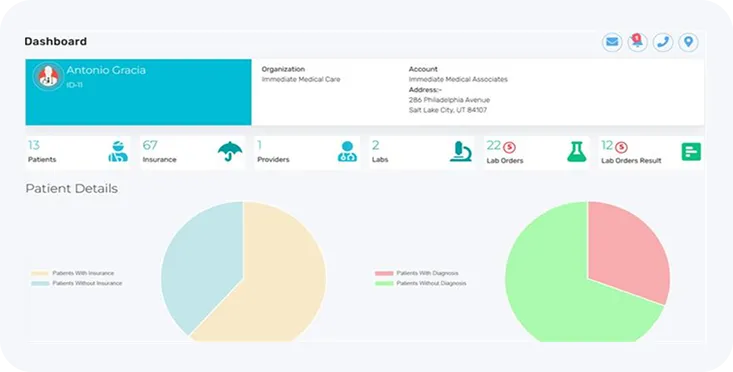
Our logistics suite delivers end-to-end visibility and control across the specimen lifecycle, from collection to lab intake. Intelligent routing and real-time ETA updates uphold chain-of-custody integrity and auditability at every step. Merged with lab intake systems, it supports auto-reconciliation and rapid processing. Designed for decentralized models like mobile phlebotomy, in-home diagnostics, and large-scale testing that require strict compliance and transparency.
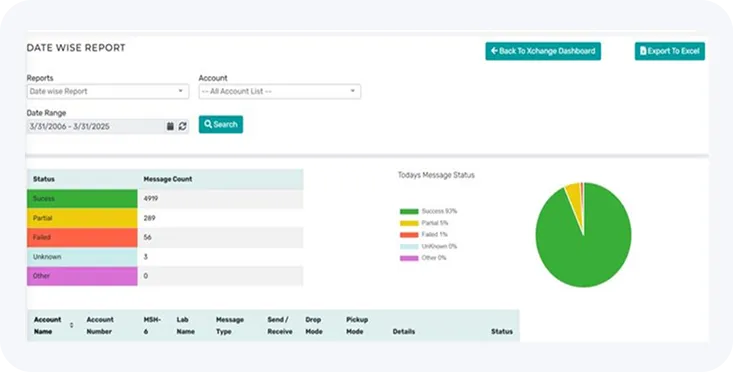
We build customized LIS and LIMS solutions optimized for scalability, interoperability, and regulatory compliance (HIPAA, CLIA, CAP). Modular platforms are modified to fit unique scientific and operational workflows, integrating smoothly with third-party devices and enterprise health IT. Our agile delivery model uses feedback-driven prototyping to accelerate time-to-value while maintaining high standards in quality and compliance.
OmniXchange: EHR-Integrated Lab Interface Software for Physician Practices
OmniXchange, the premier interoperability platform from OmniMD, reinvents how Electronic Health Record (EHR) systems and Laboratory Information Systems (LIS) communicate.
Developed for healthcare corporations seeking data fluidity without compromising security or compliance, our solution enables bi-directional, real-time integration across fragmented systems, regardless of vendor, format, or complexity.

Cross-Platform EHR Integration
OmniXchange accepts laboratory orders from any EHR platform, accurately receiving data in varied formats, including HL7, JSON, XML, and CSV. The platform’s adaptive interface architecture ensures rapid onboarding and frictionless integration, even in highly heterogeneous environments.
Semantic Normalization and Data Standardization
As soon as it’s received, every piece of incoming data is cleaned up and converted into HL7 format, removing inconsistencies and making sure it flows smoothly into any lab system, so everything stays connected and works without extra effort or fixes.
Secure and Compliant Data Routing
Orders are securely sent to partner labs using trusted protocols like SFTP, TCP/IP, and SOAP-based web services. Everything follows industry best practices to ensure full compliance with HIPAA and HITECH, keeping data safe every step of the way.
Structured Result Integration
Once lab work is complete, results are automatically organized and returned to the original EHR. This keeps data accurate and ensures insights are clear, structured, and ready for action right at the point of care, without adding extra steps or complexity.
Experience the OmniMD Advantage
Real Stories From Medical Practices Thriving With OmniMD
What Is Lab Interface Software and Why Physician Practices Need It
Lab interface software is middleware that connects your EHR or practice management system to external reference labs and in-office analyzers. Without it, a physician who orders a CBC or metabolic panel initiates a paper or phone-based chain: a staff member calls or faxes the order, the specimen is collected, the result arrives by fax, and another staff member manually transcribes the values into the patient chart. Each handoff is an opportunity for error, delay, and duplicate work.
The downstream costs of this manual model are specific. Industry research on lab ordering practices consistently shows that paper-based processes produce approximately 30 percent repeat or duplicate orders, because staff cannot verify at order time whether a test was already sent. Transcription errors in manual result entry cause result inaccuracies that require repeat draws. And when results arrive by fax in batches, abnormal values compete with normal results on a stack of paper rather than being surfaced immediately to the ordering provider.
Lab interface software eliminates each of these gaps. Orders are placed electronically inside the EHR and transmitted directly to the lab system via HL7. Results return electronically and are filed automatically in the patient chart, with abnormal values flagged. The ordering provider is notified when results arrive. Staff time previously spent on order transcription and result entry is redirected to higher-value clinical work.
For a medical practice ordering 30 or more lab tests per week, the operational difference between a connected and a disconnected lab workflow is measurable in staff hours, error rates, and result turnaround time from the first month of go-live.
How OmniXchange Lab Integration Works: Step by Step
OmniXchange sits between your EHR and the lab system, translating and routing data in both directions without requiring manual intervention at any step. Here is the complete order-to-result workflow:
- Order entry in the EHR: The physician selects a test (CBC, HbA1c, lipid panel, etc.) directly in the OmniMD EHR. No separate order form, no fax, no phone call.
- HL7 ORM message generation: OmniXchange generates an HL7 Order Request Message (ORM) containing the patient demographics, ordering provider, test codes, and insurance information. The message is transmitted to the designated lab system in real time.
- Lab acknowledgment: The receiving lab system sends back an HL7 acknowledgment confirming order receipt. Order status is visible in the EHR without staff needing to call the lab.
- Specimen collection and processing: The specimen is collected (in-office draw, patient service center, or mobile phlebotomy) and processed at the lab. STAT orders are flagged and routed with priority handling.
- Result transmission: Completed results are transmitted from the lab as an HL7 Observation Result Unsolicited (ORU) message. OmniXchange receives, validates, and normalizes the data against the correct patient record.
- Automatic chart filing: Normalized results are filed directly into the patient chart in the OmniMD EHR, organized by test category and date. Abnormal values are flagged at the result level, not buried in a result document.
- Provider notification: The ordering physician is notified that results are available. Critical values trigger immediate notification. No staff needs to manually route the result to the provider.
OmniMD deployment data shows this end-to-end workflow delivers results to the physician chart approximately 62 percent faster than fax-and-transcription workflows, measured from lab result release to provider-ready chart entry.
LabCorp, Quest Diagnostics, and Regional Lab Partner Coverage
OmniXchange supports bidirectional integration with the two largest national reference lab networks in the United States and with hundreds of regional, specialty, and independent reference labs. Practices do not need to negotiate separate technical agreements with each lab; OmniMD manages the lab-side connection as part of the integration deployment.
| Lab Type | Coverage | Integration Type |
|---|---|---|
| LabCorp | National network, all 50 states | Bidirectional HL7 (orders + results) |
| Quest Diagnostics | National network, all 50 states | Bidirectional HL7 (orders + results) |
| Regional Reference Labs | State and regional independent labs | HL7, SFTP, SOAP, or file-based |
| Specialty Reference Labs | Genetics, pathology, toxicology, microbiology | Custom interface per lab protocol |
| In-Office Analyzers (POL) | Point-of-care devices, in-house analyzers | Direct device interface, result auto-filing |
For practices that use multiple labs, OmniXchange routes each order to the correct lab based on test type, insurance requirements, and patient location, all without requiring the ordering provider to know which lab handles which test. The revenue cycle management connection ensures the correct lab billing codes and insurance identifiers accompany each order automatically.
CLIA Compliance and Lab Result Documentation Requirements
The Clinical Laboratory Improvement Amendments of 1988 (CLIA) regulate laboratory testing performed on specimens derived from the human body. If your practice runs any in-house testing, including point-of-care glucose meters, urine dipsticks, rapid strep tests, or INR monitors, your office is operating a physician office lab (POL) under CLIA and must maintain specific documentation records for each test performed and each result issued.
CLIA categorizes tests into three complexity levels. Waived tests (dipsticks, rapid tests, single-analyte glucometers) require a certificate of waiver and basic quality documentation. Moderate-complexity tests require a certificate and defined quality control procedures. High-complexity tests (most send-out reference lab panels) require a certificate of compliance and comprehensive quality management programs.
OmniXchange supports CLIA documentation obligations in two ways. First, every electronic order generates a timestamped record in the EHR: test ordered, ordering provider, date and time, patient identity verification, and specimen collection details. This record satisfies the CLIA requirement for a test requisition record. Second, every received result is filed with a receipt timestamp, result values, reference ranges, and abnormal flags, creating the CLIA-required patient result record. Practices using OmniXchange have a complete electronic audit trail that satisfies CMS CLIA inspection requirements without maintaining paper logs.
For practices that order tests requiring prior authorization from payers before the specimen draw (common in advanced imaging-adjacent lab panels, certain genetic tests, and high-cost specialty assays), OmniXchange flags these tests at order time so staff can initiate prior authorization before the patient leaves the office.
Electronic Lab Orders vs. Manual Paper Workflows: The Operational Impact
The case for electronic lab ordering is strongest when you quantify what manual workflows actually cost in staff time and clinical accuracy. Here is a direct comparison across the workflow steps that matter most to physician practices:
| Workflow Step | Manual (Paper/Fax) | OmniXchange (Electronic) |
|---|---|---|
| Order placement | 5 to 7 minutes per order (form completion, fax, confirmation call) | Under 60 seconds in EHR, auto-transmitted |
| Duplicate order rate | Approximately 30% (staff cannot confirm prior order status) | Near zero (prior orders visible at order entry) |
| Result entry to chart | 3 to 5 minutes per result (fax receipt, manual transcription, filing) | Automatic, no staff action required |
| Transcription error rate | Present in manual entry; requires result verification | Eliminated; data transmitted directly from lab instrument |
| Result delivery to provider | Hours to next business day after fax receipt | 62% faster; results in chart within minutes of lab release |
| Abnormal value routing | Manual: staff reviews fax, flags critical values | Automatic: critical values trigger immediate provider alert |
For a practice processing 40 lab orders per week, the time difference between manual and electronic workflows represents 5 to 7 staff hours weekly. Applied to coding and billing, clean electronic results with standardized LOINC codes feed directly into AI-assisted medical coding, reducing the diagnostic code error rate that causes claim denials on lab-associated visits. And because results in the chart carry the lab’s reference range and abnormal flag, clinicians spend less time interpreting raw numbers and more time acting on them, improving the accuracy of follow-up codes in medical billing.
OmniXchange Lab Integration Across Medical Specialties
Lab testing volume and test complexity vary significantly by specialty. OmniXchange is configured for each practice’s specific test panel mix, with result routing rules that match the clinical workflow of the ordering specialty.
| Specialty | Common Lab Orders | OmniXchange Workflow Benefit |
|---|---|---|
| Primary Care | CBC, CMP, lipids, HbA1c, TSH, urinalysis | Annual wellness panel ordering sets; trending across visits; chronic disease monitoring |
| Cardiology | BNP, troponin, lipids, coagulation (PT/INR), CRP | STAT result routing for troponin and BNP; INR monitoring from RPM-connected devices |
| Endocrinology | HbA1c, fasting glucose, insulin, TSH, vitamin D | HbA1c trend graphing across visits; glucose log integration with POL meters |
| Oncology | CBC with differential, tumor markers (PSA, CEA, CA-125), pathology specimens | Specimen routing to specialty pathology lab; critical value alerts for counts below threshold |
| Nephrology | BMP, eGFR, creatinine, urine studies, phosphorus, PTH | Dialysis patient lab monitoring with automated result trending; critical eGFR alerts |
| Dermatology | Skin biopsy pathology, KOH prep, wound culture | Pathology result routing from dermatopathology labs; biopsy result linked to visit note |
Specialty-specific result routing rules are configured during OmniXchange implementation. Practices do not need to create custom routing logic; OmniMD’s implementation team applies pre-built configurations for each specialty and adjusts them based on the practice’s specific lab panel preferences.
What OmniMD Practices Report After OmniXchange Go-Live
The most consistent feedback from practices deploying OmniXchange for the first time is that the change in staff behavior is visible within the first week: no one is printing fax cover sheets, no one is on hold with a lab confirming an order, and no one is manually entering a result page-by-page into the chart. The workflow change is immediate because the manual steps are completely replaced, not supplemented.
“What I see consistently when a practice moves from paper lab orders to OmniXchange is that the first clinical benefit is speed: providers see critical results faster because the result appears in the chart the moment the lab releases it, not the next morning when a staff member sorts through a fax queue. The second benefit takes 30 to 60 days to measure but is often larger: duplicate order rates drop significantly once providers can see at order entry whether a test was already sent. Practices that previously saw 25 to 30 percent of their lab orders as repeats or duplicates typically get that figure below 5 percent within two months.” – Dr. Giri, OmniMD Medical Director. Verified on July 2, 2026.
At the 90-day mark, practices running OmniXchange report an average of 45 minutes per day recovered from manual lab result transcription and routing tasks across clinical and administrative staff. For practices with one or more staff members spending significant time on lab-related phone calls, result routing, and manual data entry, this represents direct reallocation of labor to patient-facing clinical work.
Who Should Use OmniMD Lab Solutions?
OmniMD lab solutions fit practices and health systems that need electronic lab ordering and result integration as a functional workflow requirement, not a nice-to-have feature.
- ✓ Physician practices ordering 20 or more lab tests per week where manual order and result workflows consume measurable staff hours daily.
- ✓ Practices with in-office POL equipment (glucose analyzers, CBC counters, urine analyzers) that need results filed directly to the patient chart without manual entry.
- ✓ Multi-specialty groups ordering from multiple reference labs with different test panels and different result routing requirements for each specialty line.
- ✓ Practices currently using paper or fax lab orders where duplicate order rates, result transcription errors, and slow result delivery are known operational problems.
- ✓ Chronic disease practices (endocrinology, nephrology, cardiology) requiring frequent lab monitoring where trending across visits is a clinical necessity, not just a documentation preference.
- ✓ Practices participating in value-based care programs (ACO, MSSP, MIPS) where documented lab monitoring is required for quality measure reporting and care gap closure.
Not the right fit: Hospital reference lab systems with their own LIS infrastructure and dedicated lab IT teams. OmniXchange is designed for the physician practice and ambulatory care market, not for full-scale hospital laboratory operations.
