
Suki vs DeepScribe: Pricing and Insights
DeepScribe and Suki AI are leading players in the growing AI medical scribe market. Both aim to free doctors from time‑consuming EHR work. DeepScribe focuses on creating high‑quality, specialty‑specific notes, while Suki offers a voice‑driven platform for documentation, commands, insights, and automation.
This guide draws on years of healthcare technology experience. It provides a clear, honest comparison with practical tables, real‑world workflows, and easy decision frameworks to help you choose confidently.
Start With The Right Questions
Before comparing features, the most important step is clarifying what problem you are truly trying to solve.
Key questions to answer internally.
Primary pain point
- Is the main issue after‑hours charting, visit throughput, provider burnout, or coding/revenue leakage?
- DeepScribe is often chosen as a ‘pure ambient scribe’ to eliminate note‑writing; Suki is often justified when you also want voice commands, clinical Q&A, and tight EHR control from one assistant.
Practice profile
- Independent/small group vs. enterprise system; specialty mix; visit volumes; proportion of telehealth.
- Many independent practices favor simpler ambient tools with easier rollout (DeepScribe), while large health systems with Epic, Cerner or similar may lean toward richer assistants like Suki.
IT capacity and EHR strategy
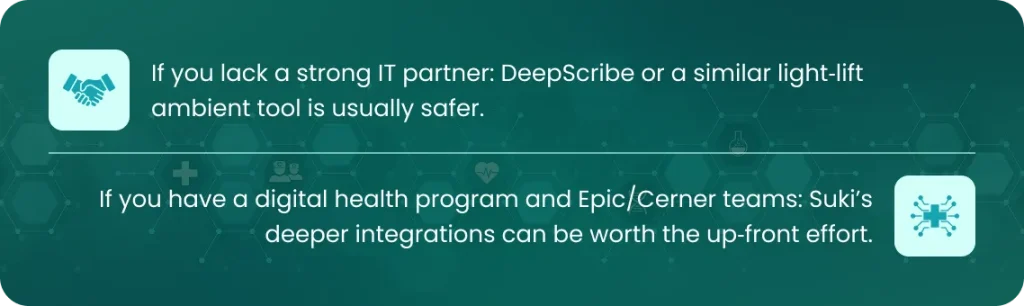
- Do you have internal IT and integration resources or do you need something close to ‘turnkey’ with minimal build?
- Suki’s deeper, bidirectional EHR workflows often require more structured rollout; DeepScribe is frequently deployed with lighter IT lift.
- If you do not align on these questions, you will end up comparing specs instead of outcomes, and that is where adoption failures often start.
DeepScribe vs Suki
Positioning of the two products
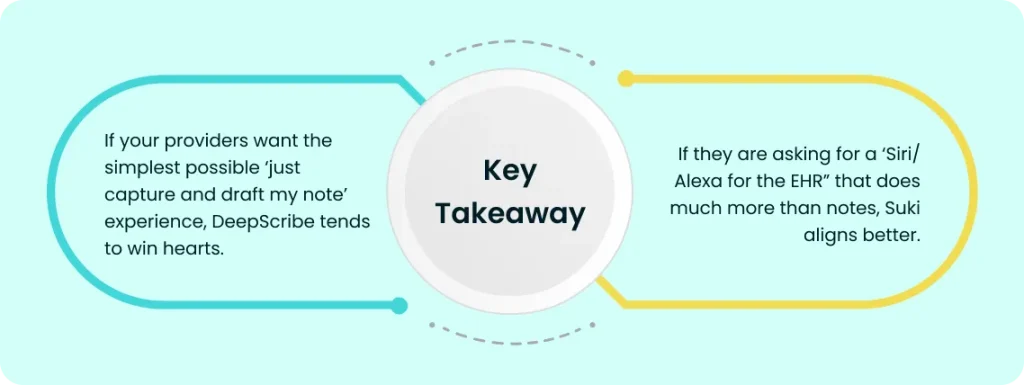
- DeepScribe: Ambient AI medical scribe that listens to the visit and generates a structured note customized to specialty and provider style; strong on ease of use, specialty customization, and ‘straightforward ambient’ workflows.
- Suki AI: Ambient clinical intelligence platform and AI assistant that combines ambient scribing, dictation, voice commands, coding suggestions, summaries, and clinical Q&A, with deeper EHR control in higher‑end deployments.
Comparing Core Dimensions
Clinical Experience and Workflows
Vendors demo well, but your clinicians live in the day‑to‑day friction.
A. How the encounter actually flows
DeepScribe
- Sits in the background as an ambient listener during the encounter, then generates a complete SOAP‑style note that reflects the clinician’s specialty and preferences.
- Its strength is “I just talk to my patient, and the note shows up,” with models tuned to differences between, for example, cardiology and pediatrics.
- Good fit for providers who do not want to think about commands or multitasking, they want ambient capture and a review pass afterwards.
Suki AI
- Can operate in ambient mode but also supports explicit commands: “Hey Suki, show me my next patient,” “Insert normal lung exam,” “Draft assessment and plan,” etc.
- Also supports dictation‑style workflows and pre‑charting, letting providers combine ambient, structured commands, and old‑school dictation depending on the visit.
- Better fit for clinicians who are comfortable with a voice assistant and want more control inside and outside the room (e.g., quickly summarizing labs or generating patient instructions).
B. Editing burden and note quality
- Reports describe DeepScribe as investing heavily in transcription fidelity and specialty‑specific note quality; the system adapts to clinician phrasing and template preferences over time.
- Suki’s drafts are often praised as ‘sounding like I wrote it,’ especially for narrative portions, but providers sometimes trim assessment/plan verbosity.
In practice, both will require some level of review and editing, but:
- DeepScribe: slightly more ‘note‑first’ orientation, designed so that the main deliverable is the encounter note itself.
- Suki: note is one deliverable among many (instructions, Q&A outputs, order staging, etc.), so you need to think broader than just note quality.
Integration, IT Effort, and Rollout Realities
From an adoption standpoint, integration and rollout can matter more than the AI itself.
A. Ease of implementation
Independent, third‑party comparisons consistently show:
DeepScribe
- Categorized with tools like Freed and OrbDoc as relatively easier to implement: mobile app options, minimal IT for many independent practices, and lighter EHR footprints.
- Typical contracts involve setup fees and at least a year commitment, but the technical lift per practice is often lower.
Suki
- Rated as moderate implementation effort; some customers use it in a ‘copy‑and‑paste’ mode, while others invest in deeper API‑based EHR integrations.
- Implementation timelines range from ‘minutes’ for lighter integrations (e.g., certain athenaOne deployments) to several weeks for deep Epic connections.
B. EHR footprint and future‑proofing
- DeepScribe integrates with multiple common EHRs and is often positioned as the ambient layer that outputs structured notes into existing workflows.
- Suki’s strategy is to become a broader ‘ambient intelligence layer’ over the EHR with bidirectional, real‑time interactions, something health systems increasingly prioritize for long‑term stack evolution.
If your organization is moving toward a more AI‑driven EHR front‑end over the next 5 to 10 years, investing in the broader assistant capabilities may be a strategic choice.
Cost, ROI, and Contract Risk
Sticker price is only one dimension; you need to think in terms of ROI profile and risk.
A. Pricing ranges and structures
Independent sources give the following directional ranges:
DeepScribe
- Around 300 to 500 USD per clinician per month depending on volume, term, and features.
- Frequently includes setup fees in the 500 to 2,000 USD range per practice and typically requires at least a one‑year commitment; volume discounts at 10+ and 50+ providers.
Suki
- Suki Compose at ~299 USD/month; Suki Assistant at ~399 USD/month per user.
- Annual contracts are standard; prices adjust based on user count, EHR depth, support tier, and enterprise features.
B. Where each tends to pay off
DeepScribe’s ROI case is usually framed around:
- Reduced after‑hours charting
- Slight increase in visit capacity and productivity
- Improved provider retention and satisfaction through reduced documentation burden.
Suki’s ROI case often adds:
- Revenue uplift from better coding and documentation completeness
- Time saved via voice navigation, orders, pre‑charting, and quick summaries
- Potential efficiencies for complex multi‑site groups using one assistant across workflows.
For small practices operating on thin margins, the question is often, “Is the extra breadth of Suki worth the incremental complexity and cost versus a focused ambient solution?”
Evidence, Ratings, and Reputational Signals
In an environment crowded with marketing claims, independent signals are useful.
- DeepScribe highlights a 98.8 KLAS spotlight score, reported as one of the highest in the ambient scribe category.
- Suki has also been recognized in KLAS spotlight reports (around 93.2/100 in one ranking) and appears in independent “best AI scribes” guides as a leading voice‑first option.
- Comparative guides repeatedly mention both in the top tier of AI scribes, with nuances: Suki praised for mobile/voice workflow and breadth; DeepScribe for straightforward ambient performance and specialization.
From an adoption standpoint, both are mature enough that concerns shift from “will it work at all?” to “will it fit our culture, workflows, and budget?”
Organizational Fit: Who Should Pick Which?
DeepScribe tends to be a better fit if:
- You are a small to mid‑sized practice or specialty group with limited IT support and want a simple, ambient note solution.
- Your providers are overwhelmed by charting and want to talk naturally and simply approve the note afterwards, without learning commands.
- Your main success metric is reduction in after‑hours charting and burnout, not necessarily a broad AI assistant that touches every workflow.
Suki tends to be a better fit if:
- You are a larger group or health system with Epic, Cerner, athenahealth, or MEDITECH and have IT capacity to support deep integration.
- Your clinicians are open to a voice‑driven assistant that handles not just notes, but navigation, orders, summaries, coding suggestions, and clinical Q&A.
- You are building a long‑term strategy around ambient clinical intelligence and want one AI layer that can expand into new workflows over time.
How To Run a Smart Evaluation (Step‑By‑Step)
To avoid shiny‑object syndrome, structure the evaluation.

Define clinical cohorts and use cases
Start with 1 to 3 specialties where documentation burden is highest and providers are open to change (e.g., primary care, cardiology, rheumatology).

Standardize success metrics
Target metrics: after‑hours charting time, in‑visit screen time vs. face‑time, note completion time, coding completeness, provider satisfaction, and patient experience impressions.

Shortlist 2 to 3 vendors
Include DeepScribe and Suki if they align with your EHR, budget, and IT capacity; optionally add a lower‑cost entrant for benchmarking.

Run time‑boxed pilots with clear comparators
6 to 12 week pilots per cohort, with baseline data collected for at least 4 to 6 weeks pre‑implementation.
Ensure both vendor and internal IT commit to timelines to avoid “forever pilot.”

Evaluate non‑demo realities
How often do providers override or heavily edit notes?
How many visits per day are actually documented ambiently vs. dictation vs. manual?
How many help‑desk tickets and change requests appear in the first 4 weeks?

Negotiate contracts around outcomes where possible
For enterprise deals, consider phased rollouts with options tied to provider adoption or defined ROI thresholds.
This approach helps you move from subjective impressions (“Dr. Smith likes Suki’s voice commands”) to measurable outcomes (“burnout and after‑hours charting dropped X% in the Suki cohort, Y% in the DeepScribe cohort”).
Practical Decision Rules
Given everything above, here are concise, real‑world heuristics.
Choose DeepScribe if:
- You want the clearest path to ambient documentation with minimal complexity and strong specialty‑aware notes.
- Your IT capacity is limited and you need faster, lighter deployments.
- Your providers are skeptical of “yet another tool” and want something that feels invisible during the visit.
Choose Suki if:
- You are willing to pay and invest in rollout for a more comprehensive AI assistant that not only writes notes but helps navigate, summarize, and code.
- You have a strategic EHR roadmap and see ambient intelligence as a core layer in that future stack.
- Your clinicians are comfortable with or excited about voice commands and using AI beyond documentation.
Disclaimer
This comparison guide is for informational purposes only and draws from publicly available data, industry analyses, and general healthcare IT insights as of early 2026. Product features, pricing, integrations, and performance can change; always verify current details directly with DeepScribe and Suki AI through demos, pilots, and contracts. No endorsement or affiliation exists with either company. Healthcare decisions should involve clinical leadership, IT evaluation, legal review for compliance (e.g., HIPAA), and consideration of your specific workflows, EHR, and patient population. Past performance does not guarantee future results, and ROI varies by practice. Consult professionals for tailored advice.