Patient Portal Software
OmniMD patient portal software gives patients 24/7 access to their health records, appointment scheduling, secure messaging, and billing in one HIPAA-compliant platform that connects directly to your EHR.
Patient Journeys Reimagined, From First Touch to Last
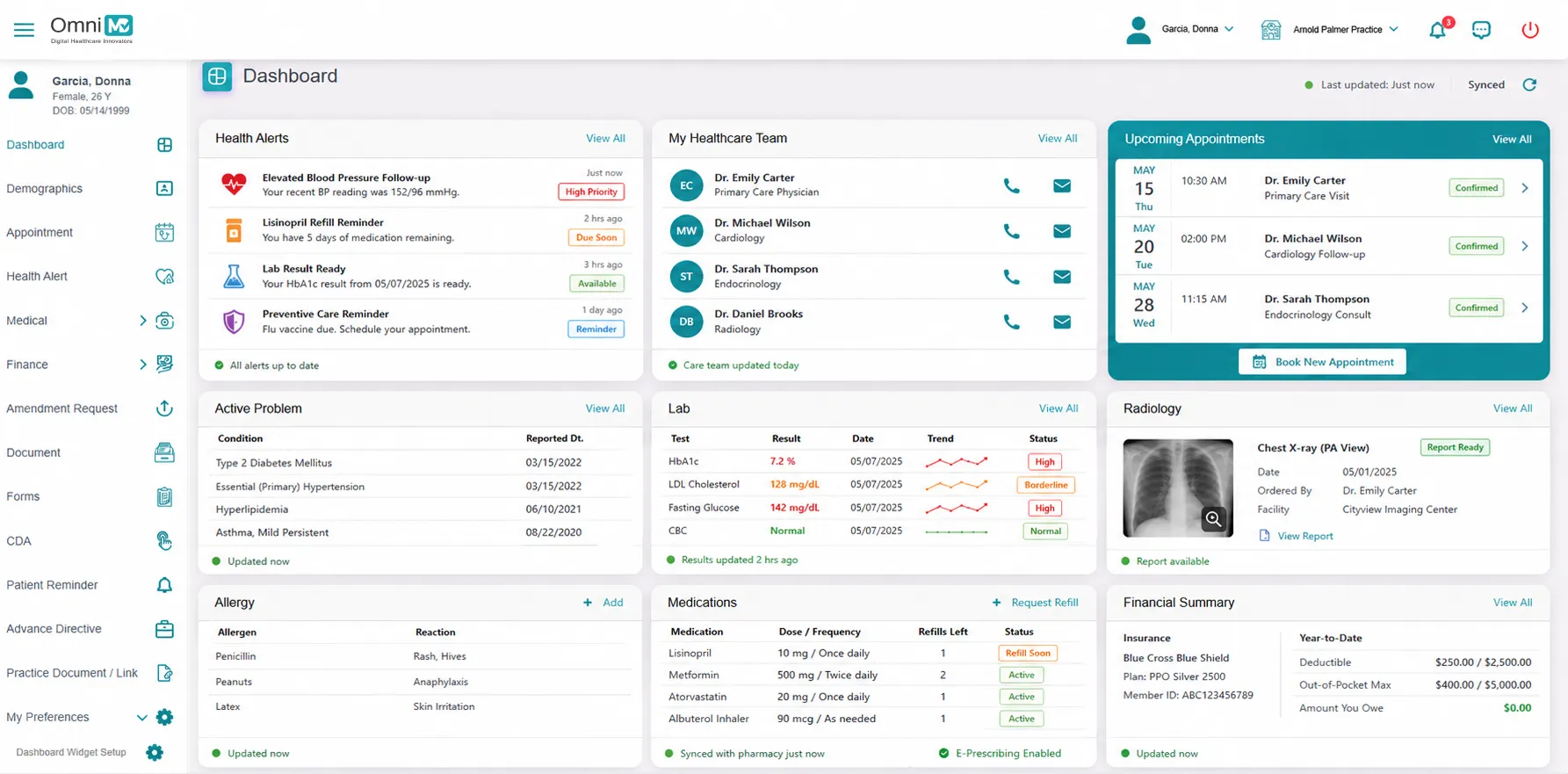
Real-Time Access to Medical Information
Eliminates information latency. Engages patients with their complete medical profiles, labs, e-prescribing, and historical data, through a continuously synchronized interface that reflects clinical updates as they occur. Real-time access to medical information fosters transparency and accountability, transforming passive record-keeping into an active instrument of trust and informed participation.
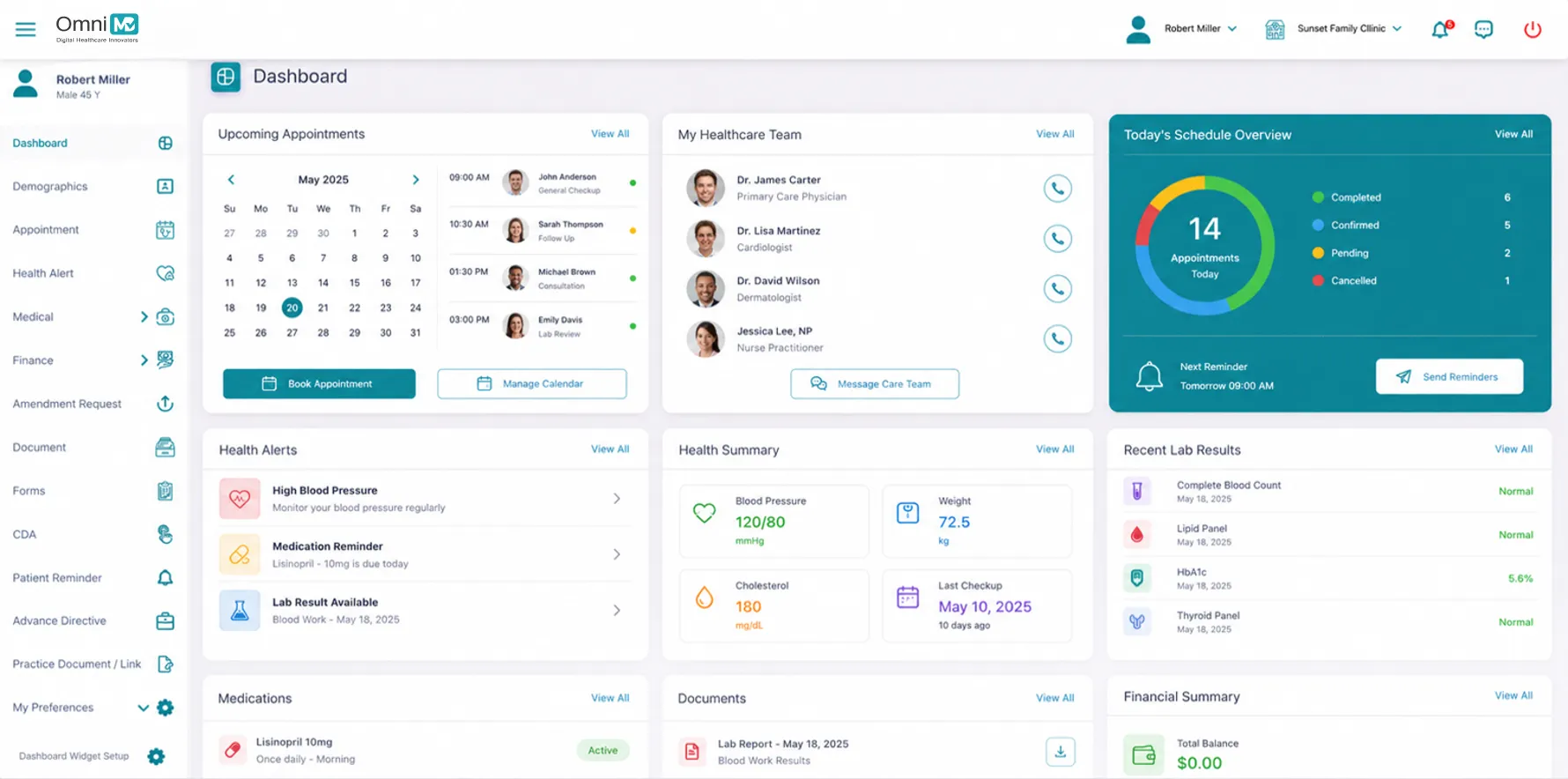
Easy Appointment Scheduling
Reengineer Appointment Scheduling as a zero-fiction transaction. Patients can select, modify, or cancel appointments through a smart availability model that adapts to provider load and urgency tiers. Automated reminders are timed automatically to reduce no-shows and optimize calendar utilization without human dependency.
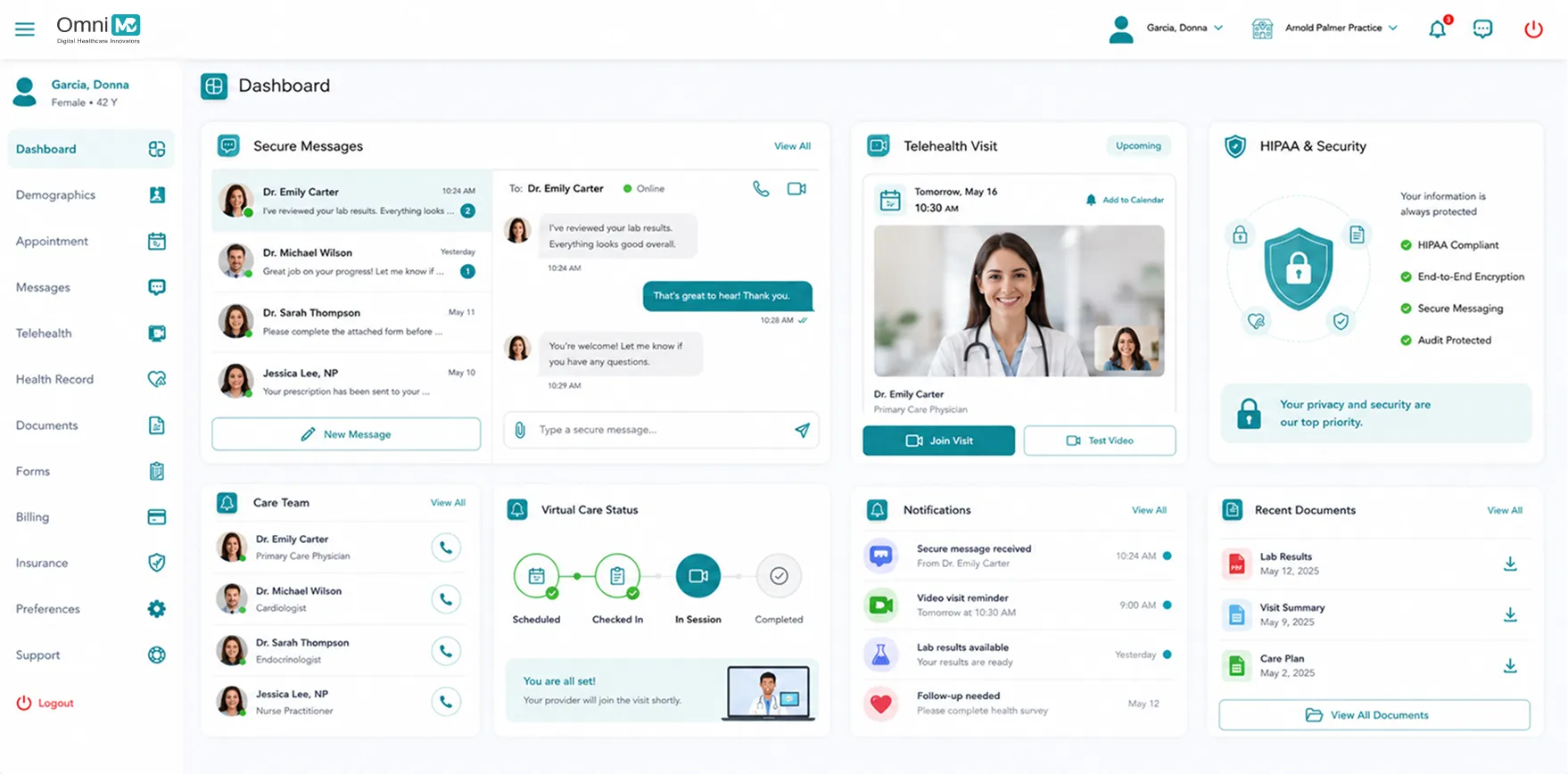
Secure Messaging
In a structured care dialogue system embedded with hospital-grade HIPAA compliance, patients and clinicians exchange updates and messages within encrypted, HIPAA-compliant channels that ensure continuity, documentation, and accountability. Elevates virtual care from convenience to standard practice. Patients schedule, join, and complete secure video consultations directly through the portal. Our Telehealth stack is directly integrated, compliant, scalable, and context-aware, ensuring clinical quality is never diluted by distance.
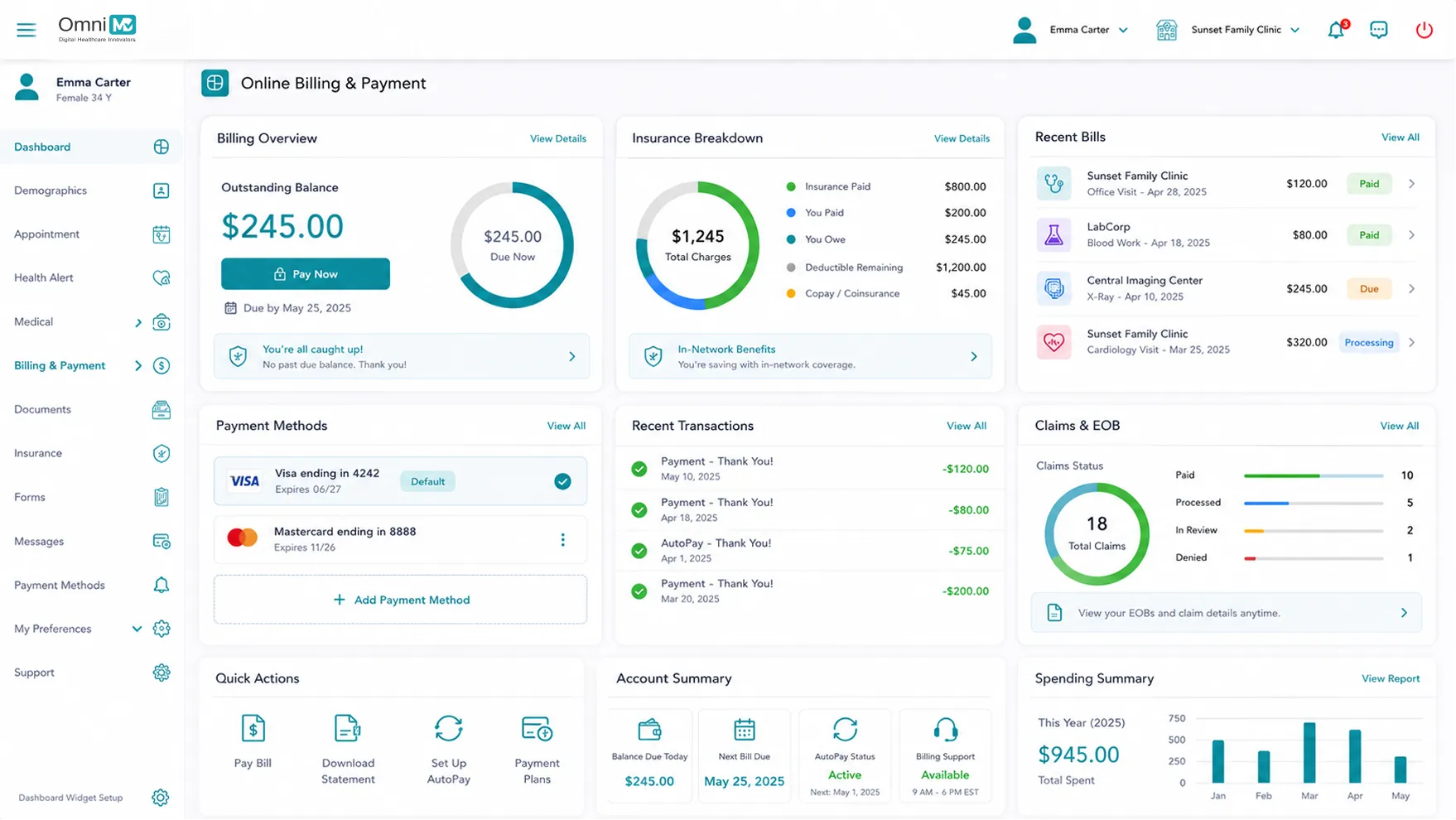
Online Billing and Payment
Financial transparency is built into every interaction. Patients receive structured bills, insurance breakdowns, and real-time payment options through a centralized interface. Beyond transaction capability, our system clarifies cost structures, reduces inbound billing queries, and enhances revenue capture with clarity-first financial UX.

Patient Portal With Telehealth
and EHR Integration
+ patient portal connects directly to your EHR, practice management system, and billing platform so data entered by patients flows into the clinical record automatically. Appointment requests populate your scheduler. Lab results posted by your EHR appear in the portal without staff re-entry. This unified data flow removes the manual handoffs that create errors and staff frustration in practices using disconnected portals.

24/7 Health Record Access

HIPAA-Compliant Communication

Customized Care Instructions

Integrated EHR+RCM+PMS+RPM
Experience the + Advantage
Real Stories From Medical Practices Thriving With +
After comparing many EMRs, I determined that + was the best software for my new clinic. I run a high volume family practice clinic. + is used for scheduling, reminder calls, medical records, insurance and patient billing. + is a critical tool for my practice. It is a very good software, but I am also very pleased with the level of service + provides with their technical support team.

Our practice has been very pleased with the outcomes of your billing and collection services. You have been both informative and patient as we continue to become a more efficient practice. We have recognized that collections have been improved due to your diligence and tenacity. Thank you for your kindness and hard work.
+’s EHR and Billing software has truly streamlined our operations at Solid Sobriety. Their billing tools have improved our efficiency, significantly reducing errors and boosting revenue. What stands out most is their exceptional customer support- the team is always available, knowledgeable, and proactive in solving any challenges we face. We couldn’t be happier with the partnership.
I have been a practitioner for over a decade and worked various EMR programs in the past by far + surpasses all my expectations. It’s easy to navigate and your entire note in one page with only a few clicks to complete. I own a family medical practice/ spa and I am very happy that I chose +. Their support staff is amazing they are always available to assist you.


What is Patient Portal Software?
Patient portal software is a secure online platform that gives patients direct access to their health records, appointment scheduling, provider messaging, and billing outside of the clinical visit. Patients log in to view lab results, request prescription refills, review care instructions, pay bills, and communicate with their care team without calling the front desk.
The U.S. Department of Health and Human Services requires healthcare providers to give patients electronic access to their health information under the HIPAA Privacy Rule. A patient portal is the primary mechanism practices use to meet this requirement while improving patient engagement and reducing administrative workload.
Modern patient portals differ from basic EHR patient access in one critical way: integration depth. A portal that connects to your EHR, practice management system, and billing platform operates as a single data environment. Patient-entered information updates clinical records directly. Lab results from the EHR appear in the portal automatically. Appointment requests from the portal appear in the scheduler immediately. Practices running disconnected portals spend hours each week on data reconciliation that an integrated platform eliminates.
Patient Portal vs. Patient Engagement Platform
A patient portal handles transactions: record access, scheduling, messaging, and payments. A patient engagement platform adds proactive outreach such as automated recall reminders, chronic disease check-ins, post-visit follow-up surveys, and care gap notifications. + combines both in one system so practices do not need separate platforms for portal access and patient outreach.
How Patient Portal Software Reduces Staff Workload
Every action a patient completes in the portal is one fewer phone call, front-desk interaction, or manual data entry task for your staff. Practices with high patient portal adoption consistently report measurable reductions in administrative volume within the first 90 days of go-live.
- Appointment scheduling: Patients who book, reschedule, or cancel online eliminate 3 to 5 minutes of staff time per change. For a 500-visit-per-month practice, this recovers 25 to 40 staff hours per month.
- Automated reminders: Practices using portal-based reminder workflows report 20 to 30 percent reductions in no-show rates compared to manual phone reminders. Each recovered appointment slot represents direct revenue.
- Secure messaging: Patient questions answered through the portal are documented automatically, reducing phone call volume and the re-entry of verbal instructions into the chart.
- Online bill payment: Patients who pay through the portal eliminate manual payment posting for most transactions. Practices report 15 to 25 percent improvements in self-pay collection rates when billing is accessible online.
- Digital intake: Patients who complete registration before their visit eliminate the front-desk bottleneck. Data entered through + portal syncs directly to the AI Front Desk and practice management system without manual re-entry.
How to Choose Healthcare Patient Portal Software: 5 Key Questions
1. How deep is the EHR integration?
Ask vendors specifically how data flows between the portal and the EHR. Bidirectional real-time integration means patient-entered data updates the clinical record without staff intervention. ONC-certified FHIR 4.0.1 interoperability is the current standard for real-time data exchange. Batch-sync integrations create reconciliation work and data lag that most practices underestimate at procurement.
2. What is the patient adoption support model?
A portal that patients do not use delivers no value. Ask: do existing patients get automatic enrollment or must each patient self-register? What percentage of patients at comparable practices actively use the portal within 6 months of go-live? What patient-facing support does the vendor provide? Practices with strong vendor adoption support consistently achieve higher portal utilization than those handling patient onboarding independently.
3. How does migration from your current system work?
Get a written migration plan before signing. It should cover: patient data export from the current system, timeline from contract to go-live, data validation before cutover, parallel operation period, and whether staff training is included in implementation fees. + implementation teams manage the full migration for each practice with a dedicated specialist through go-live.
4. What HIPAA compliance certifications does the vendor hold?
Every patient portal vendor should provide a signed Business Associate Agreement before accessing any patient data. Verify: AES-256 encryption for data in transit and at rest, role-based access controls, full audit logging, and breach notification procedures compliant with the HIPAA Breach Notification Rule. Ask whether the portal has undergone independent security assessments.
5. Does it support mobile access without a separate app?
Mobile-responsive web portals accessible on any smartphone browser achieve higher patient registration and active usage rates than app-only solutions. Requiring patients to download a native app creates a friction point that reduces adoption, particularly for older patient populations. + patient portal is accessible from any device without an app installation.
Patient Portal Implementation Timeline
Implementation timelines depend on practice size, EHR integration complexity, and whether you are migrating from an existing portal.
| Practice Size | Go-Live Timeline | What Is Included |
|---|---|---|
| Solo or small (1-3 providers) | 2 to 4 weeks | EHR connection, data migration, staff training, go-live support |
| Group practice (4-15 providers) | 4 to 8 weeks | Role-based config, portal branding, patient enrollment, parallel run |
| Multi-location (15+ providers) | 6 to 12 weeks | Phased rollout, multi-TIN config, custom workflows, full data migration |
Each + implementation includes a dedicated specialist who manages technical setup, EHR connection, and go-live support. Existing patients are automatically notified and guided through portal registration without staff manually contacting each patient.
Why EHR-Native Patient Portals Outperform Standalone Solutions
Most patient portals on the market are standalone products that connect to an EHR through scheduled data exports or HL7 integration layers. Data entered in the portal arrives in the EHR hours later. Lab results released in the EHR appear in the portal the next morning, not within minutes. Appointment requests logged in the portal require staff to manually transfer them to the scheduler. Each handoff is a gap where errors occur and staff time gets consumed.
OmniMD patient portal is built directly into the OmniMD EHR — not connected to it. There is no integration layer to configure or maintain. When a patient submits intake forms, the data writes to the clinical record immediately. When a provider releases lab results, they appear in the patient portal view within minutes. When a patient books an appointment, it populates the OmniMD scheduler without staff intervention. Practices that migrate to OmniMD from a disconnected portal report eliminating 15 to 25 hours per month of manual data reconciliation work within the first 60 days.
This architecture also changes what is possible for remote patient monitoring. Practices using OmniMD RPM devices can surface patient-generated health data — blood pressure readings, glucose logs, weight measurements, O2 saturation — directly inside the patient portal, giving patients visibility into their own monitoring data without a separate app or login. Standalone portals require custom API work to achieve the same result, if they support it at all.
For practices choosing between an integrated and a disconnected portal, the difference is not a feature preference — it is an operational model. The integration approach determines how much staff time the portal consumes and how accurately it reflects clinical data.
How OmniMD Patient Portal Reduces No-Shows
No-show rates in U.S. medical practices average 5 to 30 percent depending on specialty and patient population, with primary care, behavioral health, and certain specialist offices at the higher end of that range. Each no-show costs the practice the full appointment slot value with no revenue offset. For a 20-visit-per-day practice with a $180 average appointment value, a 15 percent no-show rate represents over $8,000 in lost monthly revenue before factoring in unfilled slots.
OmniMD patient portal addresses no-shows through an automated multi-channel reminder system. When a patient books through the portal or a staff member confirms an appointment in the scheduling software, the system initiates a pre-set reminder sequence:
- 72-hour reminder: Email and in-portal notification confirming appointment details with a one-click confirm or reschedule option.
- 24-hour reminder: SMS and email reminder with directions, prep instructions if configured, and a reschedule link.
- 2-hour reminder: Final SMS for same-day appointments, allowing patients to cancel in time for the slot to be filled rather than converted to a no-show.
Practices using portal-based reminder workflows report 20 to 30 percent reductions in no-show rates compared to manual phone reminders. The self-reschedule capability inside reminder links is the key mechanism: patients who cannot make an appointment can reschedule without calling the front desk, freeing the slot for another patient rather than leaving it empty.
HIPAA Compliance, BAA, and Data Security Architecture
Every interaction between a patient and the OmniMD portal involves Protected Health Information (PHI). HIPAA requires practices to sign a Business Associate Agreement with every vendor that handles PHI on their behalf. OmniMD executes a BAA with each practice before portal access is activated. This agreement defines OmniMD’s security obligations, breach notification responsibilities, and data handling restrictions under the HIPAA Privacy and Security Rules.
The technical security architecture of OmniMD patient portal includes:
- AES-256 encryption at rest: All patient data stored on OmniMD servers is encrypted using the Advanced Encryption Standard with 256-bit keys, the same standard used by U.S. federal agencies for classified data.
- TLS 1.2 or higher in transit: All data exchanged between the patient browser and OmniMD servers is encrypted during transmission.
- Two-factor authentication (2FA): Patients verify their identity through a second factor — SMS code or authenticator app — in addition to their password, preventing unauthorized access even when credentials are compromised.
- Role-based access control (RBAC): Staff access to portal data is limited to the specific records and functions each role requires. A billing coordinator does not see clinical notes. A clinical assistant does not access financial records.
- Full audit logging: Every access event — who viewed which patient record, when, and from what IP — is logged with a timestamp and retained for HIPAA audit compliance and breach investigation purposes.
OmniMD holds ONC certification, which requires the EHR and patient portal to meet specific interoperability and security standards verified by an ONC-Authorized Certification Body. This certification is a prerequisite for practices participating in MIPS (Merit-based Incentive Payment System) quality reporting under the Promoting Interoperability performance category.
FHIR 4.0.1 Interoperability and the 21st Century Cures Act
The 21st Century Cures Act, signed in December 2016 with a final ONC rule issued in April 2021, established that patients have a federal right to access their electronic health information without unreasonable delay or restriction. The rule created an information blocking prohibition: certified EHR vendors and healthcare providers cannot take actions that materially restrict patients’ access to their own health data. Non-compliance carries substantial penalties under OIG enforcement.
The technical standard the Cures Act mandates is FHIR (Fast Healthcare Interoperability Resources) at version 4.0.1. ONC-certified EHRs must provide FHIR 4.0.1 APIs that allow patients and authorized third-party applications to retrieve health data in a machine-readable format. This means patients using OmniMD can connect their health record to Apple Health, Google Health, or any other ONC-approved application using standard FHIR queries — without OmniMD acting as an intermediary in the authorization process.
For practices, this means OmniMD handles the Cures Act compliance obligation without requiring any configuration on the practice’s part. Patients who want to pull their records into a third-party health app can do so through the portal’s FHIR access flow. Practices using EHR systems without FHIR 4.0.1 support face both regulatory risk and patient satisfaction risk as patients increasingly expect data portability across their health apps.
OmniMD Patient Portal Features by Medical Specialty
A patient portal that works for a primary care practice may not address the specific documentation, intake, and communication needs of a specialty practice. OmniMD patient portal includes specialty-specific configurations across the most common outpatient practice types.
| Specialty | Specialty-Specific Portal Features |
|---|---|
| Primary Care | Chronic disease tracking, HbA1c and BP trend displays from RPM devices, preventive care reminders, annual wellness visit scheduling, medication refill requests |
| Cardiology | ECG results, blood pressure and O2 saturation readings from remote monitoring devices, cardiac rehab progress tracking, pacemaker check documentation access |
| Orthopedics | Post-operative exercise video library, physical therapy progress forms, surgical site photo uploads for remote wound assessment, pre-op instruction delivery |
| OB/GYN | Prenatal visit tracking, growth chart sharing, birth plan storage, postpartum follow-up reminders, lab result trending across pregnancy timeline |
| Mental Health / Behavioral Health | Digital intake and consent forms, mood journaling, session notes access when released by provider, PHQ-9 and GAD-7 digital submission between visits |
| Endocrinology | Glucose log integration from RPM-connected devices, HbA1c trend graphs over multiple quarters, medication adherence tracking, structured refill request workflow |
Specialty-specific portal configurations are set during OmniMD implementation. Practices activate the modules relevant to their patient population without configuring features they do not use.
How OmniMD Patient Portal Integrates with Billing, RPM, and AI Documentation
The patient portal is one component of the OmniMD platform, not a standalone product bolted onto an existing EHR. Because all OmniMD modules share the same underlying data environment, the portal reflects real-time data from clinical, billing, and monitoring workflows without requiring separate integration projects for each module.
Billing integration: Patients see their Explanation of Benefits, outstanding balance, copay estimates, and payment history inside the portal. They can pay bills, set up payment plans, and download billing statements without calling the billing department. This direct connection to OmniMD’s medical billing software eliminates the manual statement mailing and patient callback loops that cost practices 10 to 15 hours per week in billing staff time. Self-pay collection rates in practices with active portal billing typically run 15 to 25 percent higher than in practices mailing paper statements.
AI documentation integration: When a provider uses OmniMD’s AI medical scribe to generate a SOAP note, the note is reviewed and signed by the provider inside the OmniMD EHR. Once signed, the visit note is available in the patient’s portal view the same day — not after a nightly batch process. Patients see their care documentation the day of the visit. This reduces follow-up calls and messages asking what the provider documented or recommended.
RPM data integration: Patients enrolled in OmniMD remote patient monitoring see their device readings inside the same portal they use to schedule appointments and view lab results. There is no separate RPM app to install. Patients who already use the portal for scheduling and messaging are significantly more likely to check their RPM readings than patients who must install and maintain a dedicated RPM application. This reduces non-adherence caused by technology friction in chronic disease monitoring programs.
What OmniMD Providers Report About Patient Portal Adoption
Across OmniMD practices, the staff workload impacts most consistently reported at the 90-day mark are reductions in inbound scheduling calls, reductions in lab result inquiry calls, and reductions in billing inquiry calls. The combination produces a measurable decrease in front desk call volume that allows practices to handle appointment growth without adding front desk headcount.
“The question practices ask most often when going live with OmniMD patient portal is whether their patients will actually use it. In reviewing portal adoption data across practices, the answer depends on how the first 30 days are handled. Practices that enroll patients proactively at check-in and send an activation message the same day reach 55 to 70 percent active portal adoption within 90 days. Practices that leave enrollment to patient self-initiation average 20 to 30 percent. OmniMD’s automated enrollment workflow handles the proactive approach without requiring staff to manually contact each patient.” – Dr. Giriraj Tosh Purohit, Product Manager, OmniMD. Verified on July 2, 2026.
The adoption rate matters because portal value is not linear. A practice at 30 percent patient adoption captures roughly one-third of the available call volume reduction and self-pay collection improvement. Getting from 30 to 65 percent adoption more than doubles the administrative impact — which is why OmniMD’s automated enrollment workflow is the first operational recommendation at every go-live.
Who Should Use OmniMD Patient Portal?
OmniMD patient portal fits practices and groups that need a portal working natively with their EHR rather than a third-party platform requiring ongoing integration maintenance.
- ✓ Independent practices (1 to 15 providers) that want patient scheduling, messaging, and billing in one platform without a separate portal vendor contract or integration project.
- ✓ Multi-specialty groups already using OmniMD EHR that need specialty-specific portal configurations across different practice lines from a single admin console.
- ✓ Practices with high no-show rates that need automated multi-channel reminder workflows to recover appointment slot revenue without adding staff.
- ✓ Practices offering RPM services that want patients to view monitoring data without requiring a separate RPM app download and login.
- ✓ Practices managing prior authorization that want patients to view prior authorization status and upload supporting documents through the portal rather than by fax or phone tag.
- ✓ Practices reporting under MIPS that need patient engagement measures (portal use rates, electronic access) documented as part of the Promoting Interoperability performance category.
Not the right fit: Hospital systems using Epic or Oracle Cerner, which include their own native patient portals (MyChart, Oracle Health Patient Portal). OmniMD patient portal is designed for the independent and group practice market.