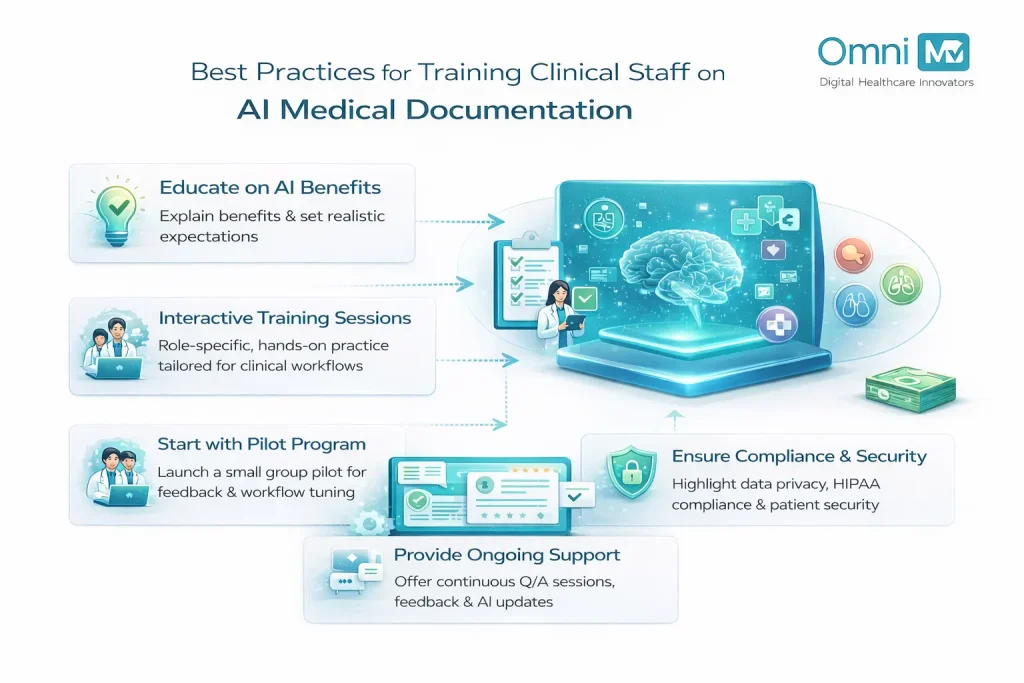
Best Practices for Training Clinical Staff on AI Medical Documentation
A recent systematic review published in PubMed Central examined the use of artificial intelligence in clinical documentation and found that AI can already structure clinical data, reduce documentation time, and support tasks that are difficult to achieve through manual workflows alone. However, the review also makes clear that these tools are not yet autonomous solutions. Their real-world impact depends on how well clinicians and staff integrate them into daily workflows, review their outputs, and address accuracy limitations. In practice, AI improves documentation only when it is paired with appropriate oversight, training, and human judgment, rather than being treated as a standalone replacement for clinical responsibility.
That finding changes how a modern U.S. clinic should think about Ambient Clinical Intelligence (ACI). It is no longer enough to “roll out a tool” and hope burnout drops and notes improve. Other studies that show real gains, like large health systems reclaiming thousands of hours of documentation time and improving physician experience with ambient AI scribes, did not get there by chance. They paired technology with deliberate training, clear workflows, and a culture where everyone from the front desk to the attending physician understands their role in supervising what the AI produces.
So, before building any training plan, it helps to treat those research insights as a mirror. That means staff need to know how to speak to it, how to audit its outputs, and how to fold it into existing clinical roles without confusion.
This guide maps a complete path to get there. It starts with preparation and flows through assessment, hands-on learning, role skills, measurement, and long-term growth. Each step links to the next, so your clinic builds momentum from day one.
Begin With a Purpose
Before training begins, every person in the clinic needs a simple answer to one question: “Why are we bringing Clinical-Grade AI Accuracy into our documentation at all?”
For most clinics, the core reasons are easy to state:
- Reduce time spent on manual charting.
- Improve completeness and consistency of notes for billing and compliance.
- Help clinicians focus more on the patient and less on the screen.
Turn these reasons into a short ‘purpose statement’ you can share while training staff on AI medical scribes. For example:
“We are using AI documentation to cut charting time, strengthen our clinical notes, and give clinicians more time with patients.”
This becomes the anchor for your entire training journey. It keeps discussions focused and reduces confusion about what the AI is meant to achieve.
Map Every Role in the Clinic
Training staff on AI medical scribes only works when it fits the real people in your building. A clinic has many roles, and each one touches documentation differently.
For example:
- Physicians (MD/DO), nurse practitioners, and physician assistants handle diagnosis, treatment, and clinical documentation at every visit.
- Registered nurses (RNs) and licensed practical nurses (LPNs) focus on patient care, recording assessments and carrying out provider orders.
- Medical assistants (MAs) keep the visit running smoothly, from taking vitals and preparing patients to supporting both clinical and administrative tasks.
- Specialists, whether cardiologists, psychiatrists, or podiatrists, bring unique, discipline‑specific documentation needs.
- Health services managers and administrators ensure that operations run efficiently and documentation supports compliance and performance goals.
- Billing and coding teams rely on detailed, accurate notes to ensure proper claims and reimbursements.
- Lab technicians, pharmacists, and therapists record the essential details of tests, medications, and treatments.
- Receptionists and front‑desk staff keep information current as they schedule visits and update patient records.
| Role | AI Training Focus | Practical Learning Outcome |
| Physicians (MD/DO), Nurse Practitioners (NP), Physician Assistants (PA) | Real-time documentation accuracy, ACI workflow integration | Efficient SOAP note generation, focus on patient interaction |
| Registered Nurses (RN), Licensed Practical Nurses (LPN) | Supportive documentation capture and validation | Coordinated patient care data capture |
| Medical Assistants (MA) | Learning triage documentation, workflow sequencing | Accurate pre-visit AI-assisted chart setup |
| Administrators and Billing Staff | Understanding AI audit trails, compliance, and accuracy verification | Optimized documentation-to-billing flow |
| Technical/IT Staff | AI Scribe EHR integration, agentic AI error handling | Minimizing data errors and maintaining uptime |
For each role, answer three questions:
- What documentation tasks does this role perform today?
- How will AI support or change those tasks?
- What decisions does this role still own, even with AI in place?
This simple mapping gives you the base for role‑specific training later. It also helps staff see that Agentic AI Documentation is meant to work with them, not replace them.
Evaluate Your Current State
Before designing training, let’s take a snapshot of where your clinic stands today. This includes skill levels, workflows, and pain points.
#1. Assess Skills and Comfort Levels
Use brief surveys and short interviews to understand:
- Comfort with EHR navigation and templates.
- Experience with dictation or voice tools.
- Confidence in reviewing and editing notes.
- Overall attitude toward digital tools and AI.
Combine self‑ratings with observation. Watch how notes are completed during a typical clinic session. Note where delays occur, where copy‑paste is common, and where staff spend time hunting for the right fields.
#2. Identify Documentation Pain Points
Look at:
- Turnaround time from visit to signed note.
- Number of incomplete or late notes.
- Common reasons for claim denials or queries, such as missing specificity.
- Feedback from clinicians about burnout, after‑hours charting, and click burden.
These pain points become your first training targets. If you know where documentation hurts most, you know where AI plus training can deliver quick wins.
#3. Define Clear Training Goals
Once you know your starting point, set specific training goals. Avoid vague targets like ‘use AI better.’ Aim for concrete outcomes that matter in daily life in the clinic.
Such as:
- “Reduce average chart completion time per visit by 30% within three months.”
- “Improve first‑pass documentation accuracy for key conditions like diabetes or heart failure.”
- “Have 90% of clinicians comfortable using AI documentation tools for routine visits.”
You can create separate goals for:
- Clinicians (quality and speed of notes).
- Billing and coding teams (fewer queries and denials).
- Administrators (better visibility into documentation metrics).
These goals shape your entire training plan and help you decide where to invest more time or create advanced modules.
Design a Layered Training Journey
Think of training staff on AI medical scribes as a journey with four levels: awareness, practice, real‑world use, and continuous improvement. Each level builds on the one before it.
#1. Awareness: ‘Meet the AI’
Help every staff member understand what the tool does, how it works at a high level, and where it fits in their workflow.
To do so:
- Run short kickoff sessions by role group (providers, nursing, MAs, admin, billing, IT).
- Show a live demo of a typical visit with AI documentation, from start to signed note.
- Explain how patient data stays secure and how the clinic stays aligned with HIPAA and other privacy rules.
Keep language simple and concrete. Avoid deep technical digressions. Focus on what staff will see on screen, what they will hear, and what they will need to do.
#2. Practice: ‘Safe Space to Try’
Let staff practice with AI without patient pressure. Create a sandbox environment using:
- De‑identified sample cases.
- Common visit types for your clinic (e.g., diabetes follow‑up, well‑child visit, acute respiratory infection).
- Realistic voice examples or structured inputs.
Run guided sessions where:
- Clinicians speak freely as they would in an exam room.
- The AI generates a draft note.
- The group reviews and edits together.
Break down each step:
- What the clinician said.
- What the AI produced.
- What needed correction.
This builds practical skills and also sharpens ‘AI literacy’, the ability to see patterns in how the AI behaves and how to steer it.
#3. Launch: ‘Go Live With Support’
Move AI into everyday visits in a controlled, well‑supported way.
Start with a pilot:
- Select a small group of enthusiastic clinicians and their teams.
- Make sure they have on‑site or on‑call support during clinic hours.
- Set a limited time frame (for example, four weeks) with clear goals.
During this stage:
- Hold daily or weekly huddles to discuss what worked and what did not work.
- Capture simple tips and pitfalls, and share them with the wider team.
- Adjust workflows in small, practical ways, for example, when the MA should start the AI session or where the nurse confirms key data.
#4. Continuously Improve: ‘Refine and Upgrade’
After go‑live, keep improving skill and results. Build routines such as:
- Monthly lunch‑and‑learn sessions on advanced features or new updates.
- Office‑hours where an “AI champion” is available for questions.
- Quarterly reviews of metrics such as note completion time, after‑hours charting, and claim denials.
Continuous improvement turns training from a one‑time event into an ongoing habit.
Build Role‑Specific Training Trackers
A single uniform training session rarely works for a mixed group that includes physicians, MAs, and receptionists together. Role‑specific tracks create depth and relevance.
#1. Physicians, NPs, and PAs
Must focus on:
- Speaking in clear, structured clinical language that AI can interpret well.
- Reviewing and editing AI‑generated notes quickly.
- Ensuring clinical reasoning and key decisions are captured clearly.
They can:
- Practice ‘thinking aloud’ in a way that maps naturally to HPI, assessment, and plan.
- Compare manual notes to AI‑assisted notes and look for gains in completeness and clarity.
- Work through complex cases where differential diagnoses matter and validate how the AI captures them.
#2. RNs, LPNs, and MAs
Must focus on:
- Capturing accurate vitals, histories, and symptom details during intake.
- Entering structured data fields that the AI can use later in the visit.
- Reviewing parts of the AI note that relate to nursing tasks and workflows.
They can:
- Simulate intake while using AI to capture key elements.
- Practice flagging missing or unclear sections before the provider signs the note.
This builds a strong link between support staff and clinicians, which makes the whole documentation process smoother.
#3. Administrators, Managers, and Billing Teams
Must focus on:
- Understanding how better documentation supports billing, compliance, and audit readiness.
- Using AI reports and dashboards to track adoption and performance.
- Designing policies for appropriate use, oversight, and escalation.
They can:
- Review sample notes and see how AI affects coding specificity and claim strength.
- Define thresholds for when to audit AI‑generated notes more closely.
#4. IT and Technical Staff
Must focus on:
- System reliability, uptime, and performance monitoring.
- Handling updates, integration issues, and vendor communication.
- Supporting secure connectivity between AI tools and the EHR.
Technical staff become key partners in maintaining a stable environment that feels dependable for clinicians.
Create a Supportive Culture Around Training
Even the best curriculum will stall if the culture resists it. Building a supportive training environment matters as much as the content. Therefore:
#1. Appoint AI Champions
Choose a few people in each role group who:
- Are curious about technology.
- Communicate clearly and calmly.
- Are respected by their peers.
These champions:
- Help lead training sessions.
- Offer quick support during clinic hours.
- Share real‑life tips that feel credible because they come from peers.
#2. Normalize Questions and Learning
Make it safe to say “I need help” or “I do not understand this feature yet.”
- Encourage team members to bring examples of confusing outputs to training sessions.
- Highlight that learning to guide AI is a new skill for everyone.
When people feel safe to ask questions, they improve faster and make fewer silent errors.
#3. Celebrate Wins
Track and share small signs of progress:
- A provider who finishes documentation during the day more often.
- Fewer rejected claims linked to documentation quality.
- Staff reporting less after‑hours work on notes.
These positive stories support motivation and show that the training effort leads to visible results.
Measure, Learn, and Improve
Training should always connect back to measurable outcomes.
#1. Define Practical Metrics
Useful metrics include:
- Time from patient checkout to signed note.
- Percentage of notes completed the same day.
- Rate of documentation‑related claim denials.
- Staff satisfaction with documentation tools, measured via short surveys.
Track these by role and by clinic site if you operate in multiple locations.
#2. Review Metrics Regularly
Set a cadence:
- Weekly or bi‑weekly reviews during early rollout.
- Monthly reviews once AI use stabilizes.
- Quarterly deep dives as part of quality and performance meetings.
Use these reviews to:
- Identify who may need extra coaching.
- Spot best practices from high performers.
- Adjust training modules to address recurring issues.
#3. Use Feedback Loops
Gather feedback from:
- Clinicians on usability and clinical accuracy.
- Billing teams on coding clarity.
- Patients if they notice any change in how visits feel.
Combine this feedback with metrics and refine your training approach. Over time, your program becomes more precise and more valuable.
For a comprehensive look at how AI hallucinations affect medical documentation and how to prevent them, see our guide to AI hallucinations in medical documentation.
Advance From Basics to Mastery
Once your teams handle day‑to‑day Natural Language Processing (NLP) in EHR
well, you can move into advanced training that unlocks more value.
#1. Advanced Features and Customization
Train teams to:
- Use templates and shortcuts that match your specialty mix.
- Leverage predictive suggestions or smart phrases.
- Tailor AI use for specific visit types or chronic disease programs.
This can further reduce charting time and also increase consistency across providers.
#2. Peer‑to‑Peer Learning
Encourage:
- Short internal workshops where providers share techniques that work best for them.
- Cross‑role case reviews where clinicians, MAs, and billers walk through one AI‑generated note together.
Peer learning often feels more relatable than top‑down instruction and keeps skills evolving in realistic ways.
#3. Align With Ethics and Governance
At the advanced stage, deepen training around:
- Responsible use of AI, including appropriate oversight.
- Clear ownership: the clinician remains responsible for the final note and clinical decisions.
- Processes for reporting and addressing AI errors or concerns.
This maintains trust among staff and patients as AI becomes more embedded in daily practice.
A 90‑Day Training Blueprint
To tie everything together, here is an example of how a U.S. clinic can roll out AI documentation training over 90 days.
#1. Days 1 to 15: Prepare and Align
- Map roles and workflows.
- Assess baseline skills and documentation pain points.
- Define training goals and success metrics.
#2. Days 16 to 45: Awareness and Practice
- Run role‑based awareness sessions for all groups.
- Offer guided sandbox practice with test cases.
- Identify and train AI champions in each department.
#3. Days 46 to 75: Pilot and Support
- Launch a pilot with a small provider group and their teams.
- Provide daily or weekly support huddles.
- Track metrics such as note completion time and staff feedback.
#4. Days 76 to 90: Scale and Optimize
- Expand to more clinicians and roles, using lessons from the pilot.
- Introduce advanced tips and customization options.
- Formalize a continuous improvement cycle with regular reviews and refreshers.
This blueprint can adapt to clinics of different sizes and specialties while keeping the same logic: evaluate, train, support, measure, and improve.
Closing Reflection: Training as the Real Technology
Undoubtedly, AI documentation tools can lower administrative burden, improve note quality, and bring attention back to the patient, yet those results depend on people, not code. When a clinic invests in thoughtful, role‑specific, and ongoing training, AI stops feeling like a mysterious add‑on and starts working like a quiet partner in every exam room, nurse station, and front desk.
Training becomes the real technology. The system that turns AI from a feature into a daily habit, and from an experiment into a core part of safe, human‑centered care.

Make AI Documentation Work for Your Clinicians
Training strategies that drive real adoption, not resistance.

Dr. Giriraj Tosh Purohit is an experienced Product Manager and Security officer with a strong background in healthcare technology and management consulting. With expertise spanning clinical workflows, EHR, RCM, Digital Health, and AI-driven products, he has been instrumental in shaping innovative healthcare solutions.